

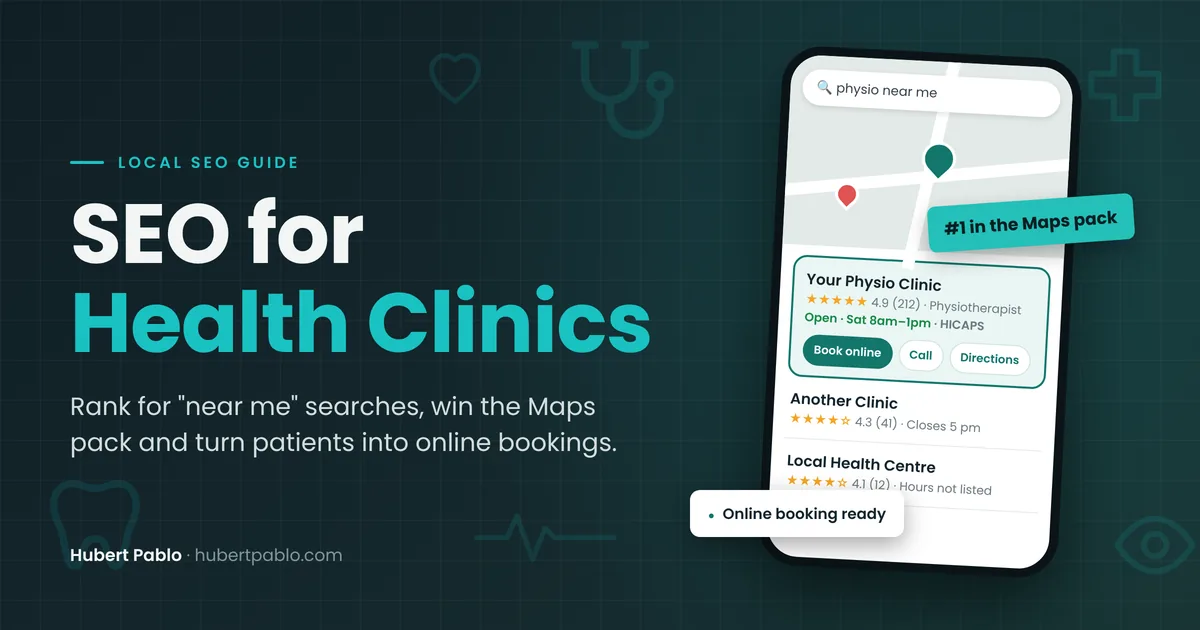
When someone’s lower back locks up on a Monday morning, or their child chips a tooth at the park, they don’t read ten clinic websites. They type “physio near me” or “emergency dentist” into Google, look at the map, check a few reviews and book whoever makes it easiest.
Healthcare SEO, or SEO for health clinics, means being one of those few clinics on the map and in the top results, whether you’re a physio, dentist, chiropractor or GP. Then the website has to answer the patient’s next three questions fast: can you treat this, when can I get in, and what will it cost me after my health fund?
Health is also a harder space than most. Google holds medical content to a higher standard, and in Australia your website is advertising under the National Law, so AHPRA’s rules on testimonials and claims apply. Some advice that works for a plumber or a café can get a clinic into trouble.
Before writing this guide, I reviewed 12 real Australian clinic websites to see what clinics actually get wrong. Here’s what I found and the 7 steps I’d follow to fix it.
In This Guide
- Healthcare SEO Audit: What I Found on 12 Australian Clinic Websites
- Step 1: Understand How Patients Search for a Physio, Dentist or GP
- Step 2: Fix the Google Business Profile Details Clinics Get Wrong
- Step 3: Show Patients Who Will Treat Them (Practitioner Pages)
- Step 4: Build a Page for Each Treatment and Condition
- Step 5: Answer the Cost, Rebate and Medicare Questions
- Step 6: Handle Reviews Within AHPRA Advertising Guidelines
- Step 7: Clean Up the Technical SEO Errors Patients Notice
- How Long Does SEO for Health Clinics Take to Pay Off?
- Medical SEO for Clinics: Frequently Asked Questions
Healthcare SEO Audit: What I Found on 12 Australian Clinic Websites
In October 2026 I checked the homepages of 12 independent clinics: four podiatrists, two physiotherapists, three dentists, a chiropractor, an optometrist and a remedial massage clinic. They are spread across Melbourne, Sydney, Adelaide, Canberra, Wollongong, Launceston, Warrnambool, Mildura, Dubbo, Rockhampton and Albany. I’m not naming them, because the point isn’t to embarrass anyone. These are good clinics with the same gaps I see everywhere.
I looked at the homepage only, the page most patients land on first from Google or the Maps listing. I checked the basics a patient (and Google) looks for: a tap-to-call number, online booking, hours, treatment pages, practitioner credentials, rebate information and whether the business details matched across the page.
| What I checked | Sites that had it | Why it matters |
|---|---|---|
| Tap-to-call phone number | 11 of 12 | Most clinic searches happen on a phone. One site showed the number as plain text, and another had the fax number stuck inside the call link. |
| Online booking or booking request button | 10 of 12 | Patients book outside business hours. One clinic only offered online booking for Pilates, not for physio itself. |
| Weekly opening hours | 4 of 12 | “Are you open Saturday?” is one of the first questions patients ask. One of the four listed two different sets of hours on the same page. |
| A page for each main treatment or condition | 5 of 12 | Patients search for the problem (“heel pain”, “root canal”), not your clinic name. One page per treatment gives Google something to rank. |
| Practitioner qualifications on the homepage | 1 of 12 | Health is held to a higher trust standard. Showing who treats patients and how they’re qualified is the quickest trust win. |
| AHPRA registration shown | 0 of 12 | Patients can check a practitioner on the public register. Linking to it costs nothing and shows you have nothing to hide. |
| Clear health fund, Medicare or DVA information | 4 of 12 | “Can I claim it?” decides many bookings. Most sites said nothing, or only showed a fund logo. |
| Suburb or location pages | 0 of 12 | Clinics drawing patients from several suburbs had no page aimed at any of them. |
| One clear H1 heading | 7 of 12 | One homepage had no H1 at all. Four had two to four competing H1 headings. |
| Consistent business details on the page | 8 of 12 | Four sites contradicted themselves on the clinic name, phone number, postcode or hours. Mixed signals confuse patients and Google. |
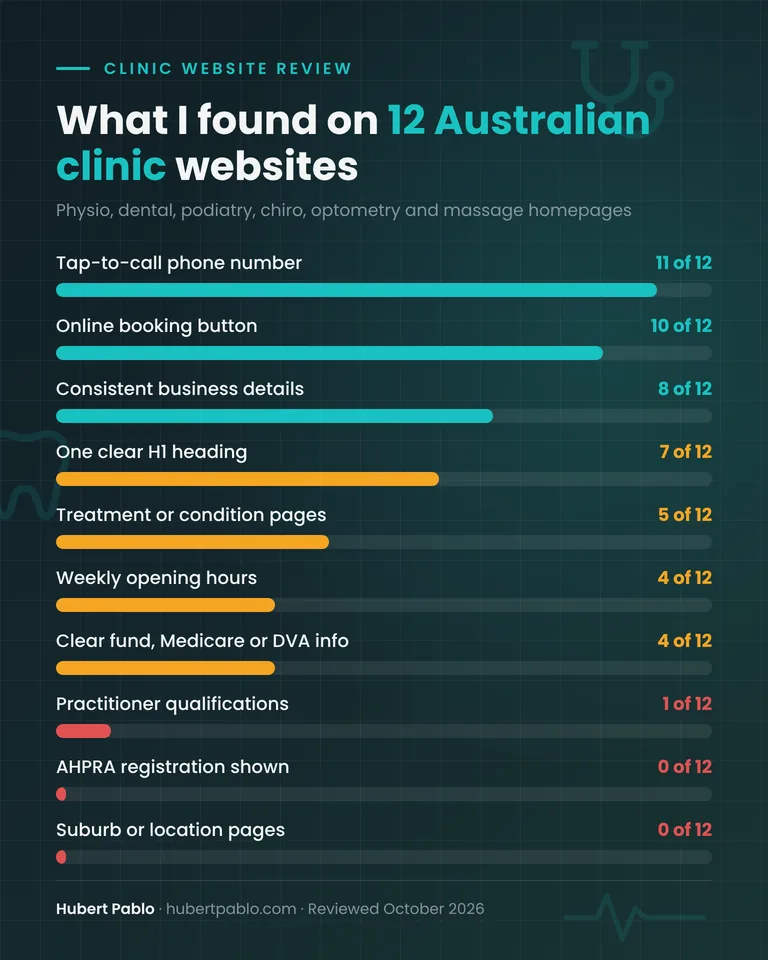
The headline: none of the 12 sites showed a practitioner’s AHPRA registration, none had suburb pages, and only one listed qualifications on the homepage. And every single site had at least one visible error, such as a broken link, a placeholder, an empty image or a typo in a treatment name. More on those in Step 7.
Step 1: Understand How Patients Search for a Physio, Dentist or GP
Patients don’t search the same way every time. They search differently depending on how urgent the problem is and how much they already know. Each kind of search needs a different page, and good SEO for health clinics means having the right page for each one.
| Type of search | Example | Page that should rank | What the page needs |
|---|---|---|---|
| Urgent / near me | “emergency dentist Dubbo”, “physio open Saturday near me” | Google Business Profile, then homepage | Hours, same-day availability, tap-to-call, booking link |
| Condition | “heel pain podiatrist Adelaide”, “sciatica chiropractor” | Condition page | Symptoms, how you assess and treat it, who treats it, when to see a GP instead |
| Treatment | “dental implants cost Mildura”, “custom orthotics Melbourne” | Treatment page | What’s involved, price range, rebates, number of visits |
| Funding | “NDIS speech pathologist”, “bulk billed physio Medicare plan” | Fees and rebates page | Plain-English eligibility, what’s covered, the gap |
Most clinic websites I reviewed only really served the first row, through the homepage. The other three are where the steady, year-round bookings come from, and they’re also the searches Google’s AI Overviews answer by pulling from clear, specific pages.
Step 2: Fix the Google Business Profile Details Clinics Get Wrong
For “near me” searches, your Google Business Profile does more work than your website. Four of the 12 sites contradicted themselves on basic details, such as two different phone numbers, two postcodes, three versions of the clinic name, and hours of “8am to 9pm” in the header next to “8:30am to 5:30pm” further down. If your own website disagrees with itself, it almost certainly disagrees with your Google profile too.
Here’s what I’d check on every clinic’s profile:
- Primary category. Use the most specific one, such as “Physiotherapist”, “Podiatrist”, “Dentist” or “Optometrist”, not a generic “Medical clinic”. Add secondary categories only for services you genuinely offer, like “Sports massage therapist” or “Pediatric dentist”.
- Business name. Use your real-world name exactly as it appears on your signage. Don’t add keywords like “Best Physio Hawthorn”. That breaks Google’s guidelines for representing your business and can get the profile suspended.
- Practitioner profiles. Google allows individual practitioners to have their own profiles. That can help an established practitioner, but it can also split your reviews. If a practitioner leaves, the profile doesn’t go with your clinic. Decide this on purpose rather than letting it happen.
- Appointment link. Point it at your real booking page (Cliniko, Nookal, HotDoc and so on). One clinic in my review had two different booking systems linked from the same homepage.
- Hours and holiday hours. Set them, keep them matching your website, and update them before Christmas and Easter. Patients who arrive to a locked door leave reviews.
- Services. List your treatments using the words patients use (“ingrown toenail treatment”, not “nail surgery under LA”).
- Photos. Show your real front entrance, waiting room, treatment rooms and team. Patients want to know where they’re going and who they’ll see.
Step 3: Show Patients Who Will Treat Them (Practitioner Pages)
Google’s quality guidelines treat health content as “Your Money or Your Life”: topics where bad information can hurt someone. That’s why experience, expertise and trust (E-E-A-T) matter more for a clinic than for most businesses. In practice, it comes down to one question: can a patient quickly see who will treat them, and that they’re properly qualified?
In my review, only 1 of 12 homepages listed a practitioner’s qualifications, and that was a dentist. Not one showed an AHPRA registration number. Several just had a “Meet the team” link with no names. One showed the same dentist’s photo four times in the team slider, with the caption “Professional Dentist” each time.
Here’s what a strong practitioner section has:
- A real photo, the practitioner’s full name and their profession (“Podiatrist”, “Dentist”).
- Qualifications and where they were earned, for example “BPod (UniSA)”.
- The AHPRA registration number, linked to the public register so patients can check it themselves.
- Special interests in plain English (“running injuries”, “kids’ teeth”, “diabetic foot care”).
- A separate bio page for each practitioner, linked from the treatments they provide.
Two things to watch. If you use “Dr”, make the profession clear (“Dr Sarah Lee, Chiropractor”), as AHPRA’s guidelines expect. And don’t call anyone a “specialist” unless they hold specialist registration. Write “special interest in” instead.
I’d also put the practitioner’s name on your treatment and condition pages as the author or reviewer, such as “Reviewed by Anna Smith, Podiatrist, October 2026”. Content reviewed by a named clinician is exactly what Google’s guidance means by trustworthy health content.
Step 4: Build a Page for Each Treatment and Condition
Seven of the 12 clinics had no individual treatment or condition pages. Their services were either listed on one page or, on one site, linked to sections of a single page. That means one URL is trying to rank for “heel pain”, “ingrown toenail”, “orthotics” and “diabetic foot check” at once, and it usually ranks for none of them.
Give each main treatment or condition its own page. A good clinic page answers, in order:
- What the condition or treatment is, in the patient’s words.
- Signs you should book (and signs you should see a GP or go to emergency instead).
- What happens at the first appointment and how many visits are typical.
- Who at your clinic treats it, with a link to their bio.
- Cost range and what health funds, Medicare or NDIS may cover.
- A clear “Book online” button and a tap-to-call number.
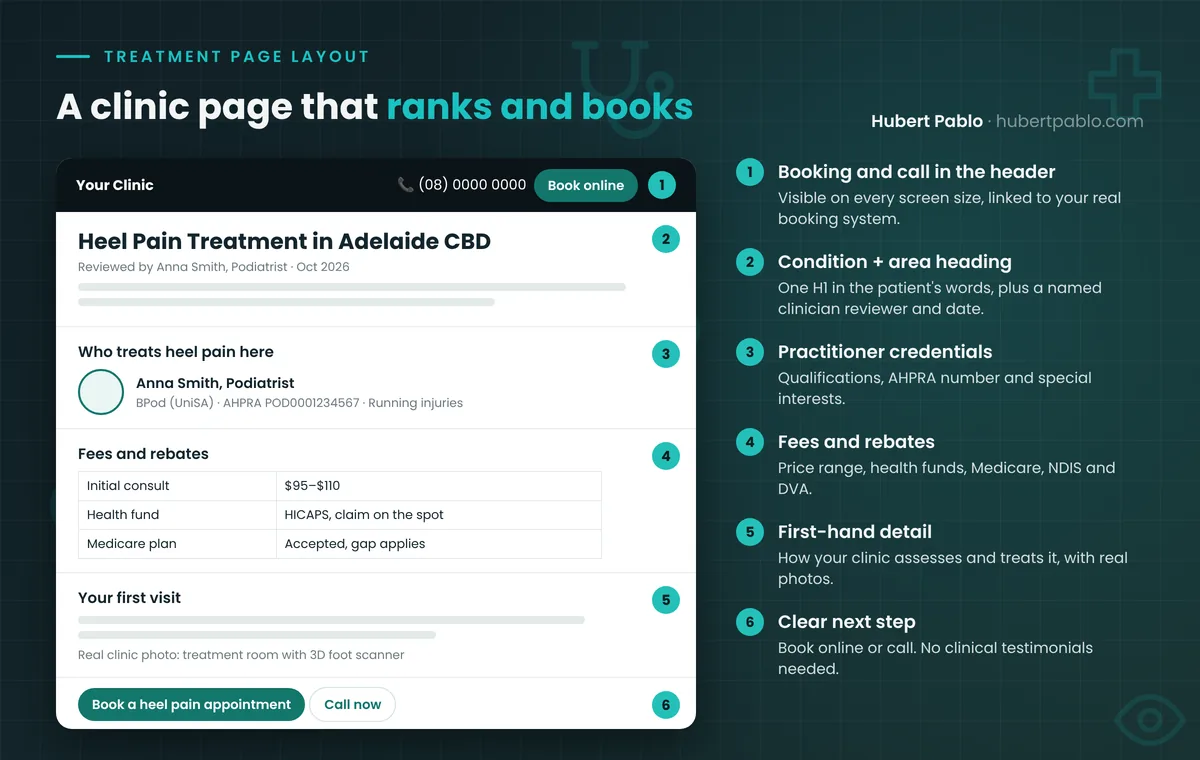
What makes a page worth ranking is the detail only your clinic can add. That might be how your podiatrists actually assess heel pain, the 3D foot scanner you use, or the fact that you run a Thursday evening clinic for school kids. A generic “What is plantar fasciitis?” article is published a thousand times already. Your version should read like it was written by someone who has treated hundreds of cases, because it was.
About suburb pages: none of the 12 clinics had them, even clinics whose copy listed nearby towns. If you genuinely draw patients from several areas, one page per area can work. But only write one if you can say something real and specific: directions and parking from that suburb, the bus route, local sports clubs you work with. A copy of your homepage with the suburb name swapped in won’t help and may hurt.
Step 5: Answer the Cost, Rebate and Medicare Questions
“Can I claim it?” is often the deciding question, and most clinic websites dodge it. Only 4 of the 12 clearly explained health fund rebates, Medicare or DVA. Others showed a fund logo with no explanation, or simply told patients to “bring your Medicare card”.
Create a plain-English Fees and rebates page that covers:
- Price ranges for the most common appointments (initial and follow-up consults).
- Private health: which funds you’re a preferred provider for, and whether you have HICAPS for on-the-spot claims.
- Medicare: whether you accept GP chronic condition management plan referrals and roughly what the gap is. For dentists, include the Child Dental Benefits Schedule.
- NDIS and DVA: whether you see self-managed, plan-managed or agency-managed participants, and whether you accept DVA cards.
Then link to that page from every treatment page. This content matches real searches, like “physio on a Medicare plan near me” or “NDIS podiatrist Rockhampton”. Almost no one in my sample was even trying to rank for them.
Step 6: Handle Reviews Within AHPRA Advertising Guidelines
This is where SEO for health clinics really differs from my plumbers guide. For a tradie, I say put your best reviews on the homepage. For a registered health practitioner in Australia, that can breach section 133 of the National Law, which bans testimonials in advertising a regulated health service.
AHPRA’s testimonial guidance draws the line at clinical content. A review that mentions symptoms, diagnosis, treatment or the outcome counts as a testimonial. Feedback about the service, like friendly staff, easy parking or running on time, can be used. If you republish reviews on your own website or social media, compliance is your responsibility.
| Review text | Clinical or not? | OK to feature on your website? |
|---|---|---|
| “Reception was lovely and I was seen right on time.” | Non-clinical (service) | Generally yes |
| “Easy parking out the back and the online booking was simple.” | Non-clinical (service) | Generally yes |
| “After three sessions my heel pain was gone!” | Clinical (outcome) | No, it’s a testimonial |
| “Best dentist in town, fixed my tooth with no pain.” | Clinical (treatment and outcome) | No |
| A widget showing your latest Google reviews, unfiltered | Depends on what patients write | Risky. Any clinical review it shows is on you. |
One clinic in my review showed a Google review feed on the homepage. Another site described its practice as “Best Dentist” and “top root canal experts”, and a third used an unsourced claim that “90%” of heel, ankle, knee and hip pain comes from the feet. AHPRA’s guidelines say you must be able to back up any claim you advertise, and that claims of a “superior” service can be misleading. None of these phrases will help rankings enough to be worth the risk.
So how do clinics use reviews for SEO? Mostly on Google itself, where you don’t control what patients write:
- Ask every happy patient for a Google review, with a short link sent by SMS after the appointment.
- Reply to reviews politely and briefly, and never confirm someone is a patient or discuss their treatment in a reply. Privacy applies to replies too.
- On your website, use your star rating and non-clinical service feedback, not treatment stories.
I’m an SEO consultant, not a lawyer. If you’re unsure about a specific piece of content, check AHPRA’s advertising hub or ask your professional association.
Step 7: Clean Up the Technical SEO Errors Patients Notice
Every one of the 12 homepages had at least one visible error. None of them would sink a site on its own, but together they tell Google and patients that nobody is looking after the website. Here’s what I found most often, and the fix:
- Heading problems (5 of 12). One homepage had no H1, and others had up to four. Use one H1 that says what you do and where, like “Podiatrist in Adelaide CBD”.
- Dead or placeholder links. Buttons such as “Visit the Kids Clinic” pointed nowhere, social icons linked to “#”, and one email address wasn’t clickable. Click every button on your homepage on your phone.
- Leftover code and placeholders. These included server error messages printed at the top of a page, a map that wouldn’t load, a shopfront video that showed its file path as text, empty images, and image file names used as alt text (“182688366.jpg”).
- Typos in treatment names. Examples were “Nail Fungas Therapy”, “orthtoics” and “Frequently Ask Questions”. Patients notice, and it undercuts the expertise you’re trying to show.
- Mixed http and https. One site’s canonical tags pointed to the old http version of its pages.
- Pinch-zoom turned off. One site blocked zooming on mobile, which is a real problem for older patients and anyone with low vision.
- Stale content. This included a COVID-safe banner still in the menu, copyright years from 2023 and 2024, and a link in the FAQ pointing to a competitor’s website.
Run your homepage and your top treatment pages through Google’s PageSpeed Insights, and check the Pages report in Search Console for anything Google can’t index. Most of these fixes are an afternoon’s work for your web developer, and they’re the cheapest win in SEO for health clinics.
Structured data is worth adding for one reason: it confirms your business details to Google. Ask your developer for LocalBusiness markup using the most specific type, such as Dentist, Physiotherapy or MedicalClinic, with your name, address, phone and hours. It should match your Google profile exactly. You don’t need special “AI” files or markup to appear in AI Overviews. Google is clear that the same SEO basics apply.
How Long Does SEO for Health Clinics Take to Pay Off?
This depends on your competition, your suburb and where your site starts from. The timings below are what I’d typically expect, not a promise.
| Timeframe | What you’re doing | What you should see |
|---|---|---|
| Month 1 | Fix Google profile, business details, H1s, broken links and booking buttons | More calls and direction requests from the Maps listing |
| Months 2–3 | Practitioner bios, Fees and rebates page, first treatment pages | New treatment pages getting indexed and appearing for condition searches |
| Months 3–6 | Remaining treatment and condition pages, steady Google reviews | Rankings for “condition + suburb” searches, more online bookings |
| 6 months+ | Clinician-reviewed articles, local partnerships and links | Steady new-patient enquiries that don’t depend on ad spend |
Medical SEO for Clinics: Frequently Asked Questions
Can I put patient testimonials on my clinic website?
Not if they talk about clinical aspects such as symptoms, treatment or results. For AHPRA-regulated professions, those count as testimonials and can’t be used in advertising. Feedback about service, like friendliness, punctuality or parking, is generally fine.
Should each practitioner have their own Google Business Profile?
Google allows it, but it splits your reviews between profiles, and a practitioner’s profile can leave with them. For most small clinics, one strong clinic profile is the better starting point.
How much should a clinic spend on SEO?
It depends on how competitive your area is. A single-location clinic in a regional town needs far less than a multi-site practice in inner Sydney. I explain the difference between what SEO costs with an agency vs an independent consultant in a separate guide.
Do I need a blog for my physio or dental clinic?
Not to start with. Treatment, condition and fees pages come first, because they match what patients search for before they book. Add articles later, where your clinicians can answer real patient questions with first-hand detail.
Is Google Ads or SEO better for a health clinic?
Ads bring calls the day you switch them on, but they stop the day you stop paying. SEO takes months but keeps working. Many clinics run ads for new or high-value treatments while their SEO builds. Remember that ads count as advertising under AHPRA’s rules too.
Healthcare SEO for Clinics: The Short Version
- Make your Google profile, website and signage say the same name, address, phone number and hours.
- Show who treats patients, with their qualifications and AHPRA registration.
- Give every main treatment and condition its own page, written with detail only your clinic can give.
- Answer the cost and rebate question plainly.
- Get Google reviews, but keep clinical testimonials off your website.
- Fix the broken links, headings and typos. Patients notice.
Want to Know What’s Holding Your Clinic Website Back?
I’ve been doing SEO for more than 18 years. Every finding in this guide to SEO for health clinics came from looking at real clinic websites, not a checklist. If you’d like the same review for your clinic, covering your homepage, Google profile, treatment pages and the AHPRA risks I spot along the way, get a free audit of your clinic website.
You can also read more about my background, see my SEO case studies, or see how the same approach works for tradies in my guide to SEO for plumbers.
How this guide was researched: I reviewed the homepages of 12 independent Australian health clinics in October 2026, using the same checklist for each. Rules on testimonials and claims are summarised from AHPRA’s advertising guidelines (in effect since 14 December 2020) and its testimonial guidance. This is not legal advice.
Found this useful?
Add me as a preferred source on Google to see more of my SEO and AI search insights in your results.